


Pixelup - AI Photo Enhancer
3.94.52K Reviews
App Specs
- Version
- 2.0.0
- Updated On
- License
- Free
- Downloads
- 10,000,000+
- Developer
- Codeway Dijital
- Categories
- Photography
- Platform
- Android
Screenshots
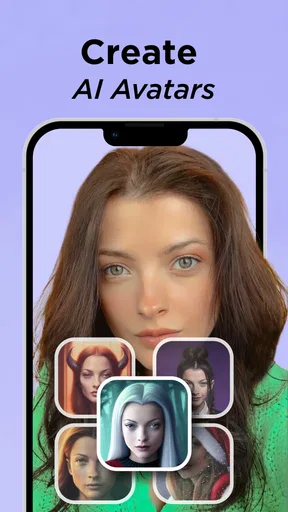
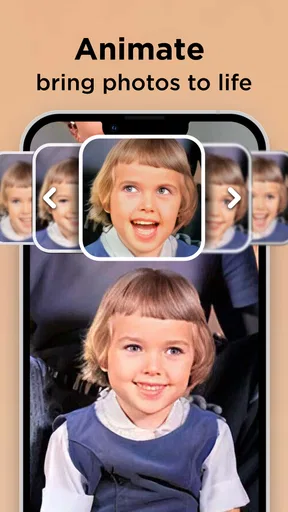
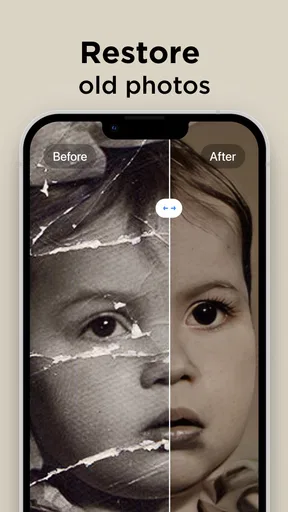
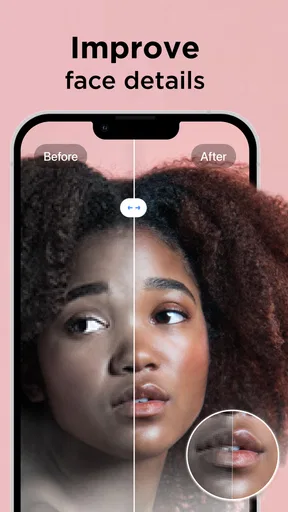
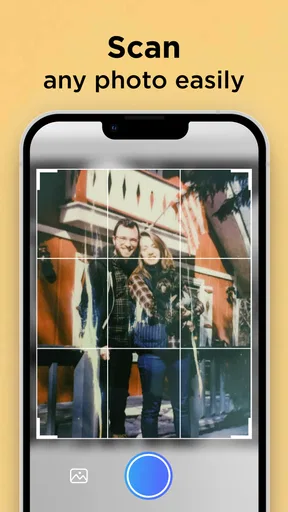
 Analysis by AppCompare
I usually judge a photo enhancer by a simple question: does it help me rescue an image I care about, without making it look like a different memory? That is where Pixelup - AI Photo Enhancer makes sense to me. It is a photography app from Codeway Dijital built around improving pictures with AI, and it is most appealing when the source image matters more than getting precise, hands-on editing control.
I would treat it as a quick repair tool rather than a replacement for a full photo editor. It is designed to help with softness, lost detail, and old monochrome pictures, but the result still depends on the original. AI can make a picture look clearer; it cannot reliably recover details that were never captured. That distinction is worth keeping in mind before you decide whether to enhance a treasured portrait or a blurry snapshot.
Where it fits in a photo-editing routine
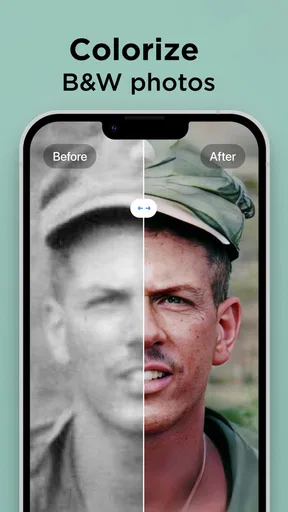
My most practical use for an app like this is a photo that is meaningful but technically disappointing: a family picture that looks soft when enlarged, a small image saved from an old device, or a black-and-white print that would benefit from color. In those cases, a one-purpose enhancer can be less intimidating than opening a comprehensive editor and adjusting sharpness, noise, contrast, and color by hand.
It can also be useful before sharing an image in a family chat or adding it to a digital album. I would first keep the untouched original, then make an enhanced copy and compare them at the size people will actually see. A result that looks convincing on a phone screen may look artificial when zoomed in, so checking the intended use is more helpful than judging only the thumbnail.
Choosing the right image and judging the result
There is a trade-off between apparent clarity and believable texture. A face can look cleaner after enhancement, yet skin, hair, or fine background details may become too smooth. I would be especially cautious with faces in a very small or heavily blurred image: the app may produce a plausible-looking result without restoring the person’s true features. For a family archive, that can be a reason to keep both versions rather than letting the enhanced one replace the original.
A useful workflow is to start with the least damaged image you can find, apply the treatment, and inspect familiar details such as eyes, lettering, hair edges, and patterned fabric. Those details reveal whether the processing has helped or merely made the image look sharper at first glance. If the result seems overworked, reducing the intensity is preferable to assuming that the strongest setting is the best one.
Who will get the most from it
I can see Pixelup suiting someone who wants a straightforward way to improve a handful of personal photos without learning a large set of editing controls. It is also a reasonable option for people restoring images for casual viewing, where a more legible, pleasing result matters more than archival accuracy. The black-and-white colorization angle may appeal to anyone curious about how an old scene could look in color, provided they treat the colors as an interpretation rather than documentary truth.
Worth Reading Before You Choose

EA SPORTS FC Mobile 26 Is a Bigger Football Game, but It Takes Time

Flipboard Shows What News Apps Must Do Beyond the Feed

Switching to Android Auto Means Rethinking Your Driving Routine

Google Calendar Makes a Crowded Week Easier to Manage

Ludo King Makes the Most of the Minutes Between Plans

Baby Panda World Brings Quick Play to Modern Phones, but Its Game Library Feels Busy
On the other hand, I would choose a conventional editor if I needed careful control over exposure, cropping, local adjustments, or a consistent look across a full photo set. Someone preparing images for professional work may want to inspect and adjust every step instead of relying on an automated result. And if a picture is already sharp, well-lit, and color-balanced, enhancing it may add little; restraint is often the better edit.
Costs, expectations, and staying in control
The app is free to install, but it includes in-app purchases ranging from $0.49 to $69.99 per item. I would try the basic workflow first and make sure the results suit my photos before paying for anything. The range makes it sensible to read the purchase screen carefully and check what a chosen option unlocks, rather than assuming that every useful enhancement requires the same payment.
Pixelup has an average rating of 3.9 from around 103,000 ratings, with about 4,500 written reviews and over 10 million installs. Those figures suggest that many people have tried it, but they do not guarantee that it will handle every kind of blur or every old print well. The app is rated for Everyone, and its current version is 2.0.0; it was released on December 21, 2021, and supports Android 8.0 and later. Codeway Dijital is the developer behind it.
A realistic way to use it
Imagine finding a soft photo of a relative in an old album just before sharing it with family. I would scan or select the clearest available copy, save an untouched version, then use Pixelup to create a separate enhanced result. I would compare the face and background side by side, dial back any treatment that makes skin look waxy, and share the version that feels most faithful. If the original is severely damaged, I would present the enhanced image as a cleaned-up interpretation, not proof of exactly how every detail looked.
That cautious approach also helps answer a common concern: will an enhancer make a blurry picture truly sharp? It may improve the impression of clarity, but it cannot promise accurate recovery from missing information. If the picture is important for records or historical preservation, keep the original scan and consider a manual restoration workflow as well. For a quick, personal share, a visually pleasing enhancement may be enough.
Transforming Your Photos with a Tap
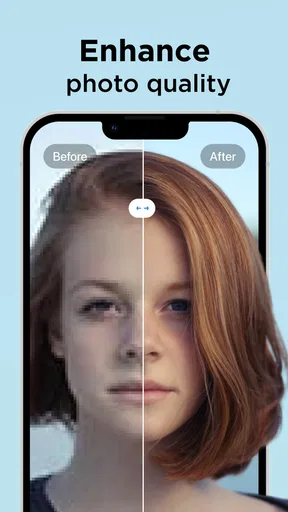
First off, let's dive into what Pixelup is all about. This app is designed to give your photos a new lease on life using the power of AI. The idea is simple: upload an image, and the app works its magic to enhance details, colors, and even fix those pesky blurs that ruin your perfect shots. It’s all about making your memories clearer and more vivid.
Getting Started
Setting up the app was a breeze. Once I downloaded it from the app store, the clean interface immediately caught my eye. It’s intuitive, which means even the least tech-savvy among us can navigate it with ease. You don’t need to be a tech guru to make your photos pop.
The Magic of AI
The core of Pixelup is its AI technology. And boy, does it deliver! I tested it on a few of my grainy vacation photos, and the results were impressive. The app enhanced the clarity and brought out details I didn’t even know were there. It’s like waving a magic wand over your pictures.
What’s really cool is how it handles color correction. The tones look natural, not overly saturated or fake. It’s all about striking that perfect balance, and this app nails it. Plus, you can adjust the intensity of the enhancements, so you have full control.
Features That Stand Out
- Batch Processing: Got a bunch of photos? No problem. You can enhance multiple photos at once. This is a huge time-saver!
- Before and After Views: Love seeing the transformation? The app lets you compare the original and enhanced versions side by side.
- Easy Sharing: Once your photos are spruced up, sharing them is a cinch. Whether it's social media or sending them to friends, it’s just a tap away.
What’s the Catch?
Now, let’s talk about the things that aren’t so rosy. While the app is fantastic, it does have some limitations. For starters, the free version has limited features. If you’re serious about photo enhancement, you might want to consider the premium version. It unlocks all the bells and whistles, but it comes at a cost.
Another thing to note is that while the AI is great, it’s not infallible. Sometimes, the enhancements can look a bit too smooth, almost like a filter. It’s best to tweak the settings to get the most natural look.
Final Thoughts
Overall, Pixelup - AI Photo Enhancer is a solid app for anyone looking to breathe new life into their photos. It’s user-friendly, packed with features, and the results speak for themselves. Sure, it has its quirks, but what app doesn’t? If you’re passionate about photography or just want to make your memories a bit sharper, this app is worth a try.
So, if you’re curious about what the hype is all about, give Pixelup a shot. It just might become your new favorite photo tool. Happy enhancing!
How it compares with manual editing
Compared with a standard editor, Pixelup puts less emphasis on building an image through individual adjustments and more on getting an automated improvement quickly. That is a useful distinction if I am preparing one old portrait for a message, but less helpful when I need a repeatable style across a collection. Manual tools let me decide exactly how much sharpening or color correction to apply; an AI approach is quicker, but its interpretation can be harder to predict from one photo to the next.
I would not use batch processing as a reason to apply the same treatment blindly to every image. It saves time when pictures have similar problems, but a dim indoor portrait, a faded outdoor print, and a grainy night shot may need different levels of correction. I would test a representative photo first, compare the output, and only then process a group. That small check can prevent a whole set from acquiring the same overly polished look.
What to watch as the app evolves
Pixelup has been available since December 21, 2021, and version 2.0.0 is its current version. That gives existing users a clear point of reference, but a version number alone does not tell me which tools have changed or how their output has improved. I would judge future changes by whether they make results more controllable and more faithful, especially for faces and older images, rather than by assuming that a newer release automatically means better restoration.
If you already use the app, it is worth keeping copies of images you care about outside the editing workflow and checking the finished image before sharing or printing it. If you are deciding whether to start, the most useful test is a photo with a real problem that matters to you, not a perfectly good image chosen just to see a dramatic effect. That keeps expectations grounded and makes it easier to tell whether the enhancement is genuinely useful.
My recommendation
I would recommend Pixelup to someone who wants a low-effort way to experiment with improving personal photos, especially older or soft images, and who is comfortable judging the output rather than accepting it automatically. I would skip it as my main tool for precision editing, dependable archival restoration, or work where every detail must remain authentic. Its strongest appeal is convenience: it can give a disappointing picture a more presentable second life, as long as I keep the original and remember that a polished result is not always a more accurate one.
Pros
- Enhances image quality significantly.
- User-friendly interface for easy navigation.
- Fast processing with minimal wait time.
- Supports various image formats.
- Offers batch processing for multiple photos.
Cons
- Requires internet for full functionality.
- Limited free features; premium needed.
- Occasional color distortion issues.
- High-resolution images take longer.
- Ads can be intrusive in free version.
FAQs for Pixelup - AI Photo Enhancer
What is Pixelup - AI Photo Enhancer?
Pixelup - AI Photo Enhancer is an app designed to improve the quality of your photos using advanced AI technology. It enhances details, sharpens images, and can even restore old or blurry photos. The app is available on both Android and iOS, offering a user-friendly interface for quick and effective photo enhancement.
How does Pixelup enhance photo quality?
Pixelup utilizes cutting-edge artificial intelligence to analyze and enhance photos. The AI identifies areas that need improvement, such as sharpness and clarity, and applies sophisticated algorithms to enhance these aspects. It can also restore colors and details in older images, making them look vibrant and clear.
Is Pixelup easy to use for beginners?
Yes, Pixelup is designed with a simple and intuitive interface, making it accessible for users of all skill levels. The app provides easy navigation through its features, allowing even beginners to enhance their photos with just a few taps. Tutorials and guides are also available to help users maximize the app’s capabilities.
Are there any limitations to the free version of Pixelup?
The free version of Pixelup offers basic enhancement features, allowing users to improve photo quality to a certain extent. However, to access advanced features such as higher resolution outputs and more in-depth editing tools, users may need to upgrade to the premium version. In-app purchases offer additional capabilities.
Can Pixelup enhance videos as well as photos?
As of now, Pixelup is primarily focused on photo enhancement. The app specializes in improving the quality of still images using AI technology. While video enhancement isn’t currently supported, the developers may consider expanding features in future updates to include video capabilities based on user demand.


